
How to Make Your In-House Video Look More Professional
The question I hear most from in-house teams is "what camera should we buy?"
That's the fourth most important question. Maybe the fifth.
If your team already makes video, and the results still look homemade, the camera is almost never the reason. After thirty years of shooting for companies of every size, I can tell you where the problems are. Most of them cost little or nothing to fix.
1. Put headphones on
This is the cheapest upgrade on the list, and it prevents the most painful mistakes.
Common issues: A microphone gets left off. A cable goes bad. A wireless mic drops signal for a few seconds every time someone's phone gets near it. None of those problems can be found looking at the camera screen. The shoot looks fine, everyone goes home, and the problem is discovered in editing, when the interview is over and the CEO is on a plane.
The fix is simple. Someone wears headphones and listens the entire time you're recording. If nobody is listening, nobody catches the problem until it's too late to fix.
Viewers will forgive a shot that's a little soft or a little dark, but viewers will not continue watching a video with bad sound.
2. Move your subject away from the background
Most in-house interviews happen in a conference room, because it's available and it's quiet. The trouble is the setup. There's a big table in the middle that forces the subject against the wall, and now you have a person sitting two feet from a flat, boring background. That's the look that screams "office video."
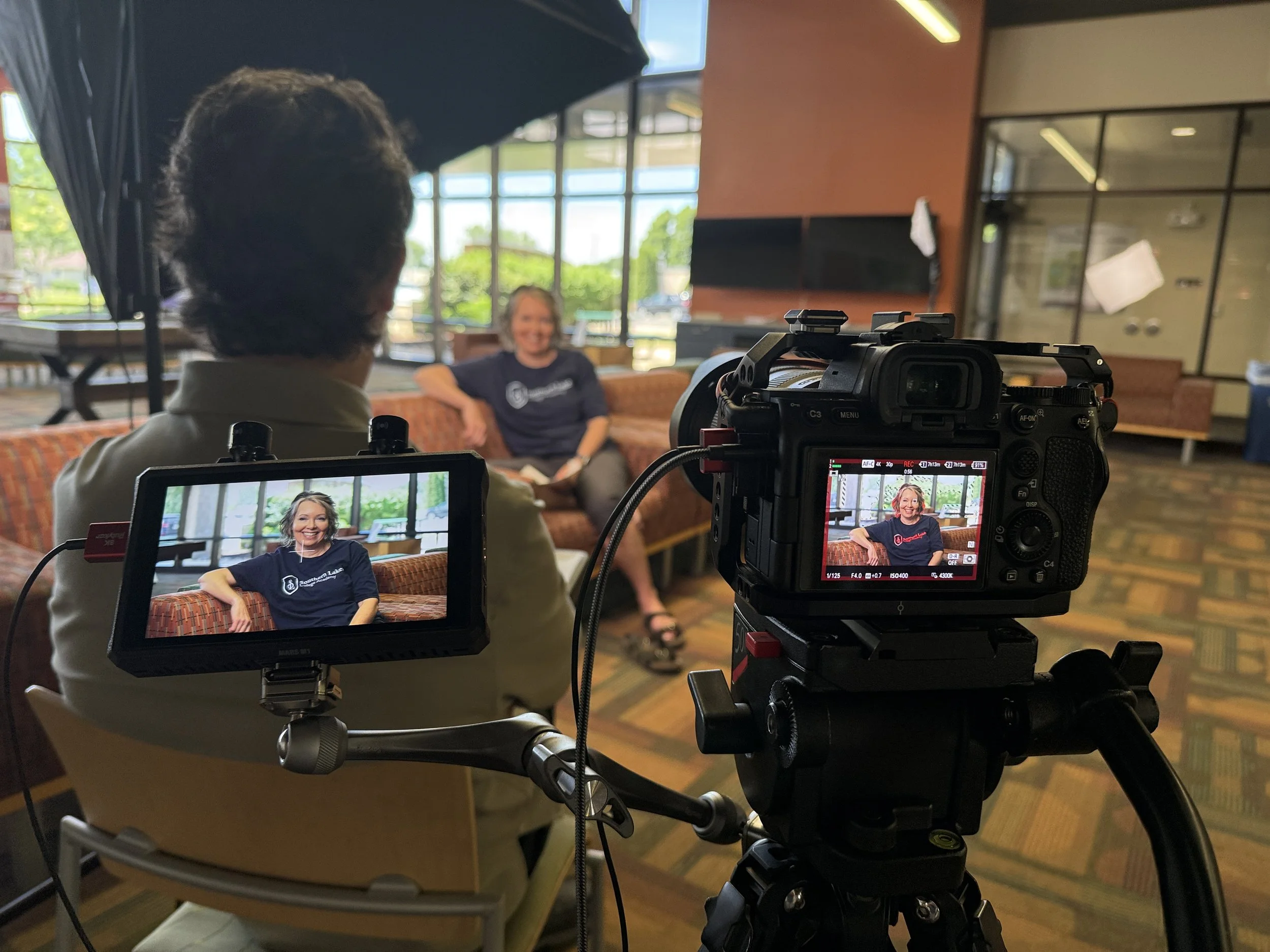
Interview
on a college campus. For lighting, only one large softbox was used.
Pull the subject away from the wall. When there's distance behind the person, the background goes soft, the subject stands out, and the shot instantly looks more polished, even on modest equipment. Find a longer room, an open office area, a lobby, hallway or just about anything with some depth to it. I personally love factory or warehouse backgrounds, school hallways, churches., etc. if they are relevant to the subject being discussed.
While you're at it, look at what's directly behind their head. A plant, a lamp, or a door frame lined up just wrong will look like it's growing out of the person. Slide the chair or camera a couple feet and the problem often disappears. It takes ten seconds to check and saves you from a shot you can't easily fix later.
3. Light the person, don't just brighten the room
Teams tend to think lighting means making sure there's enough light to see. Modern cameras handle low light well, so that's almost never the issue anymore.
The real job of lighting is to make the person look good. A light placed at an angle to the face adds shape and life. Overhead office lighting does the opposite. It puts shadows under the eyes and shine on the forehead, and it makes everyone look tired.
You don't need a truck full of gear. A window can be a beautiful light source if you place your subject correctly. Face them toward the window, not away from it, and turn off the overhead fluorescents. One decent LED panel with some diffusion will cover most of what an in-house team shoots. A softbox is even better, but can be bulky to move from room to room.
4. Stop looking for the perfectly quiet room
It used to be that an air conditioner humming in the background could really hurt a recording. Today, AI noise removal tools clean up that kind of steady background noise with results that used to require an audio engineer. The hum of the HVAC, the buzz of a refrigerator, general room tone... all that now disappears with just a few mouse clicks.
One caution. These tools are great on steady noise and less reliable on sounds made by a human voice. A loud conversation in another room can still ruin a take. So you still pause when the hallway gets loud, and you're still wearing those headphones from tip number one. But you no longer need to hunt for a perfectly silent room, and you shouldn't let a little background hum stop a shoot.
5. Use your phone for b-roll, not for the interview
Phones shoot remarkable video. For b-roll, the shots of people working, product close-ups, and quick clips around the facility, a phone in steady hands is a legitimate camera.
The interview is a different story. An interview is one continuous shot that has to hold up for twenty or forty minutes, and that's where phones show their weakness. The color can drift mid-take as the phone rethinks its white balance. Focus can wander. Handheld is too shaky for a sit-down interview, so you'd need a mount anyway.
So use the phone for what it's great at - getting supporting footage. But when someone sits down to talk on camera, a professional camera, locked on a tripod, with a real microphone on their lapel is needed.
6. Now we can talk about the camera
If you've handled everything above, your camera is probably fine. Cameras have been more than good enough for corporate work for years now. A mid-range camera with good sound, flattering light, and a subject placed well beats an expensive cinema camera with none of those things.
When a team shows me footage they're unhappy with, the camera is almost never the issue. The upgrades that matter are habits: monitoring your sound, placing your subject, shaping your light. Those travel with you no matter what gear you own.
If you have the budget and can spend some money, spend it on audio and lighting first. A camera upgrade should be the last purchase, made because you've outgrown what you have, not because you hope it fixes the look.
When it's time to bring in a pro
Some videos are low risk. A training video or an internal update can be reshot tomorrow if something goes wrong. Those are perfect for handling in-house.
Other shoots give you just one chance. The founder's retirement message. A keynote interview with a customer who flew in for the day. A video that will sit on your homepage for the next three years. For those, the stakes higher. That person needs to look good and sound good, with no shine on the face, nothing odd in the background, and no "oops" discovered in editing.
That's when it makes sense to bring in professional help, whether that's hiring the shoot out or having a pro work alongside your team.
One more thing about interviews. Everything in this article is about the technical side, but the interview itself is a separate craft. Making a nervous person comfortable, asking questions the right way, and knowing when to stay quiet is half psychology. I've written about that separately in 12 Tips for Producers Conducting Interviews.
A quick offer
If your team makes video and you'd like a second set of eyes on your setup, your gear list, or your process, I’d love to talk. You can find more information on my consulting page.